
Zonas
Your window layout is a file.
Snap windows into zones you define yourself — in a text file with comments in it, that lives in your dotfiles and follows you to every Mac you own.
Download Zonas
Free and open source · Signed and notarized by Apple · macOS 14+ · Apple Silicon and Intel
Source on GitHub ·
All versions and release notes
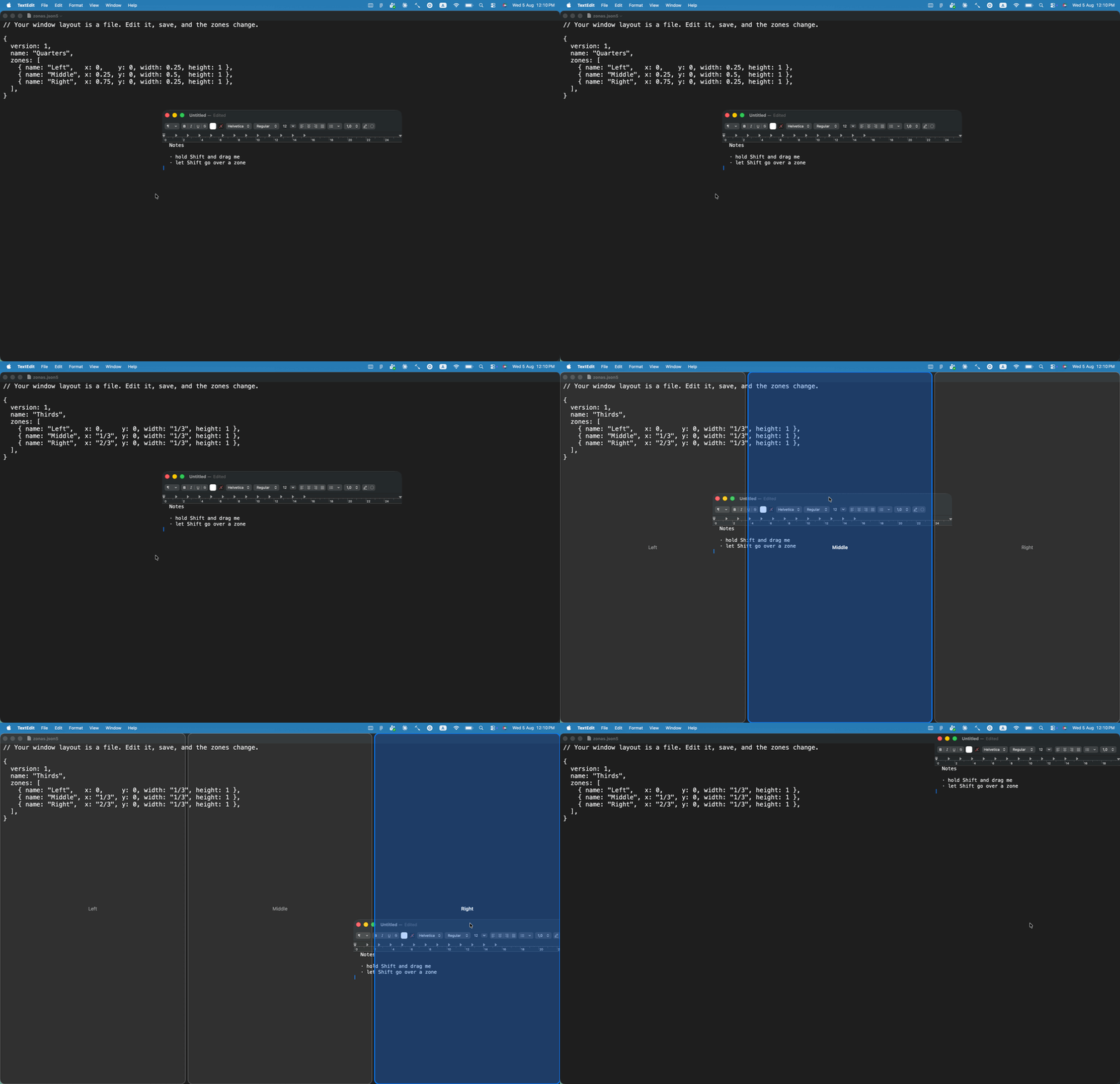
Hold ⇧, drag, let go
Hold Shift while dragging any window and your zones light up. Let go of Shift over the one you want and the window fills it. Hold ⌃ as well and the zones you sweep across are gathered into one, so a window can take two of them at once. Drag against the top edge of the screen and you are offered the whole of it. Or leave the mouse alone: ⌃⌥ with an arrow moves the front window to the next zone, and where it goes depends only on where it is. And ⌥Tab goes through your windows rather than your applications, with the zone each one is in written under its icon.
Letting go of the mouse button does not end anything, which matters on a trackpad: you can lift a finger, reposition, and take hold again without losing the gesture.
The file is the point
Not a preference pane, not a database in ~/Library. A file you write, with
comments that survive, ratios like "1/3" that are exact, and errors that tell
you which line to go and look at.
// ~/.config/zonas/zonas.json5
{
  name: "Three Columns",
  zones: [
    { name: "Left",   x: 0,    y: 0, width: 0.25, height: 1 },
    { name: "Center", x: 0.25, y: 0, width: 0.5,  height: 1 },
    { name: "Right",  x: 0.75, y: 0, width: 0.25, height: 1 },
  ],
}
Zones are fractions of the screen, so one layout works on a laptop and on a 34-inch monitor without being redrawn. Edit the file and the zones change underneath you.
What else it does
A visual editor
Click a zone to cut it in two, drag a divider to move everything lined up with it. It writes back into your file — comments where you left them.
Windows that actually move
Electron, Chromium and JetBrains windows included. An app that refuses to shrink is kept on screen instead of hanging off the edge.
An ignore list
Name an app and Zonas leaves it alone completely. zonas apps prints the
identifiers for you.
A screen for ⌘Tab
The application switcher opens wherever the Dock happens to be, and drifts. Pin it to a screen and Zonas puts it back.
The top edge maximises
Drag a window against the top of the screen and Zonas offers the whole of it. There is no zone to add: it is already in the layout you have.
Keys that do not cycle
⌃⌥ and an arrow sends the front window to the zone beside it; ⌃⌥↩ fills the screen. The same window in the same place always goes to the same zone.
Every window, not every app
⌥Tab is a strip of your windows — two Chrome windows are two stops — with the zone each is in under its icon. ⌥Q closes one; a picture of it is yours to turn on.
A command line
zonas check validates your file with a line number, fmt tidies it,
monitors tells you what to write in a rule.
Installing
- Download
Zonas.dmgand open it. - Drag Zonas onto the Applications folder. Running it from the disk image or from Downloads makes macOS ask for permission again on every launch.
- Open it from Applications. Nothing visible happens except a small grey icon in the menu bar — that is expected. Click it, choose Accessibility Permissions…, and switch Zonas on. Then hold ⇧ and drag a window.